In the fast-paced world of modern education, time is the most valuable resource. Whether you are a teacher trying to squeeze a complex lesson into 45 minutes or a student staring down a mountain of homework, the clock is always ticking.
But traditional clocks can be anxiety-inducing, and phone-based timers are just invitations for distraction. Enter MyClockTab—a minimalist, web-based tool suite designed to help the education community reclaim their focus, one browser tab at a time. 🎓
For Teachers: The Ultimate Classroom Assistant
Managing a classroom requires constant multitasking. MyClockTab simplifies the chaos without adding technical overhead.
- The "Projector-Ready" Timer: Switch to full-screen mode and project a beautiful, high-contrast countdown for group activities or quizzes. It’s clear, professional, and keeps the whole class on the same page.
- The Power of MyMessageTab: Need to give instructions while a timer is running? Use MyMessageTab to display bold prompts like "Drafting Phase: 15 Mins" or "Clean up begins in 5:00." It reduces repetitive questions and keeps the room focused.
- Zero IT Friction: Most school computers are locked down tighter than a vault. Since MyClockTab is a web app, there’s no installation required. No waiting for IT approval—just open the URL and start teaching. 🚀
For Students: Building a Distraction-Free Study Zone
For students, the biggest hurdle is the "quick check" distraction. You check the time on your phone, see a notification, and suddenly your study session is over.
- The Favicon Clock: This is the game-changer. By keeping MyClockTab open, the current time remains visible in the favicon (the tiny icon on the tab). You can be researching on Wikipedia or writing in a Google Doc and see exactly how much time you have left without ever leaving your work page.
- Custom "Study Vibes": Use the wallpaper feature to upload a calming landscape or a motivational quote. Creating a personalized aesthetic makes the desk feel like a sanctuary rather than a chore.
- The Library Hack: Don’t let your old tablet gather dust. Prop it up next to your laptop as a dedicated, full-screen Pomodoro clock. It keeps your primary screen clear for work while giving you a constant visual anchor.
Preset Themes for the Modern Classroom
Setting up your workspace shouldn't take time away from your work. We’ve designed a few one-click themes specifically for educational environments. Just click the link, and your MyClockTab will automatically update to the preset style!
1. The "Classic Academy" (Professional & Focused)
- Best for: Practice tests, timed essays, or formal assessments.
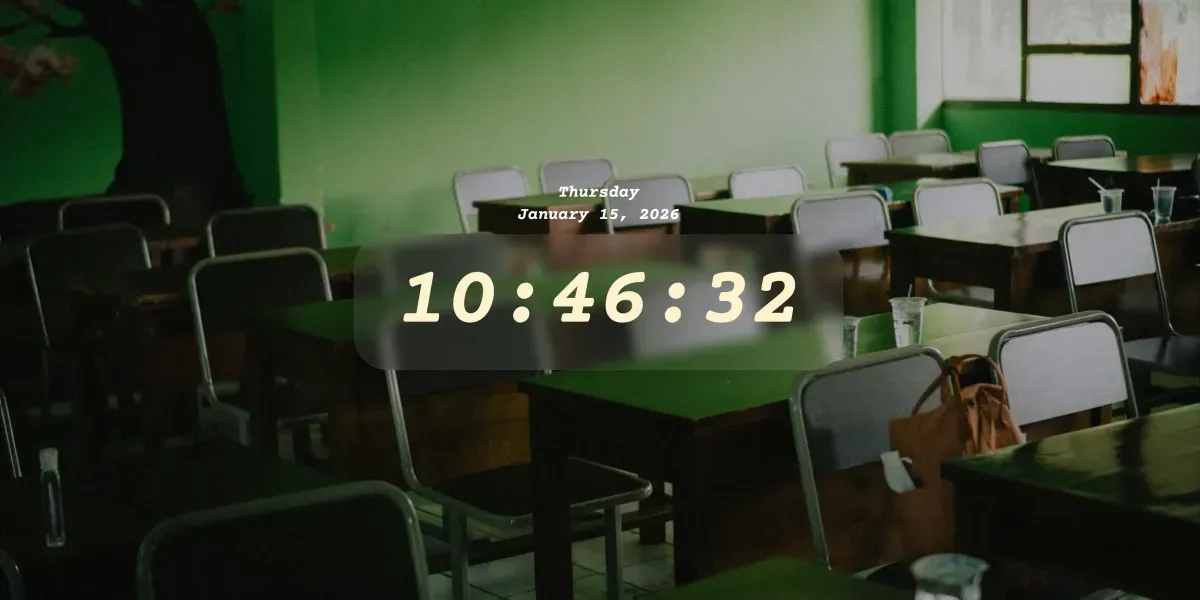
- The Vibe: A focused, traditional classroom setting featuring a deep green wall and matching desks. This "tone-on-tone" green aesthetic is designed to sharpen concentration and minimize visual clutter. It’s sharp, clear, and ensures there are zero distractions between you and your goals.
👉 Apply the "Classic Academy" Theme
The "Emerald Tide" (Serene & Vast)
- Best for: Deep focus sessions, long-form writing, or staying calm during a high-pressure study block.
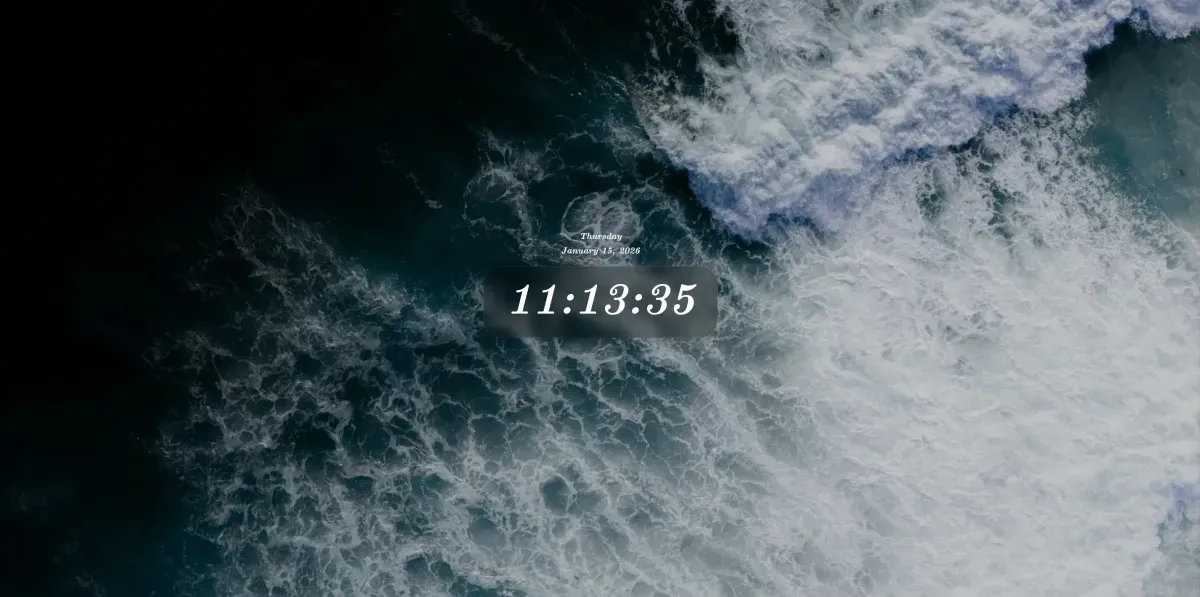
- The Vibe: A mesmerizing aerial view of a deep green ocean. The rich, dark emerald tones create a soothing atmosphere that grounds your mind, while the small font helps lower "time anxiety" by making the clock feel like a natural part of the horizon.
👉 Apply the "Emerald Tide" Theme
3. The "Creative Bubble" (Playful & Energetic)
- Best for: Group brainstorming, creative writing, science labs, or any interactive project that requires fresh thinking.
- The Vibe: A bright, open blue-sky backdrop featuring two large, vibrant rainbow bubbles. This theme is designed to keep the energy high and the ideas flowing. The light, airy aesthetic shifts your mind into "creative mode," making even the most complex tasks feel a bit more approachable.

👉 Apply the "Creative Workshop" Theme
Supporting Neurodiversity: Tackling "Time Blindness" 🧠
Many students (and teachers!) struggle with ADHD or "time blindness"—the difficulty in gauging how much time has passed or how much is left.
MyClockTab helps bridge this gap through Visual Timekeeping. By moving the clock into the browser tab, the time becomes a persistent, peripheral visual cue. It’s not an intrusive alarm that startles you; it’s a gentle, constant awareness of time that helps neurodivergent minds stay grounded in the present moment.
Privacy First: A Safe Choice for Schools
In a world where student data is often treated as a commodity, we’ve taken a different path. MyClockTab is 100% private.
- No Personal Tracking: We don’t track who you are or what you type in your timers and messages.
- Local Storage: Your settings, themes, and images stay 100% on your device.
- Transparent Analytics🛡️: We use basic, anonymous analytics to understand site traffic and improve the experience, but we never see your personal content.
Final Thoughts
Time management is a skill that takes a lifetime to master, but it starts with having the right tools. MyClockTab isn't just about counting minutes; it's about reducing the friction between you and your goals.
Whether you're grading papers or prepping for finals, let your browser tab do the heavy lifting.
Teacher/Student Challenge: Try using MyTimerTab for your next 25-minute focus session. See how it feels to have the time right there in your tab, keeping you steady.
Visit MyClockTab.com to get started.